Visibility in the App Store is survival. Even a great app fails if no one finds it. App Store Optimisation, or ASO, is the process of improving your app’s ranking and conversion rate in Apple’s App Store. For early-stage founders, mastering ASO is the cheapest way to gain traction before investing in paid ads.
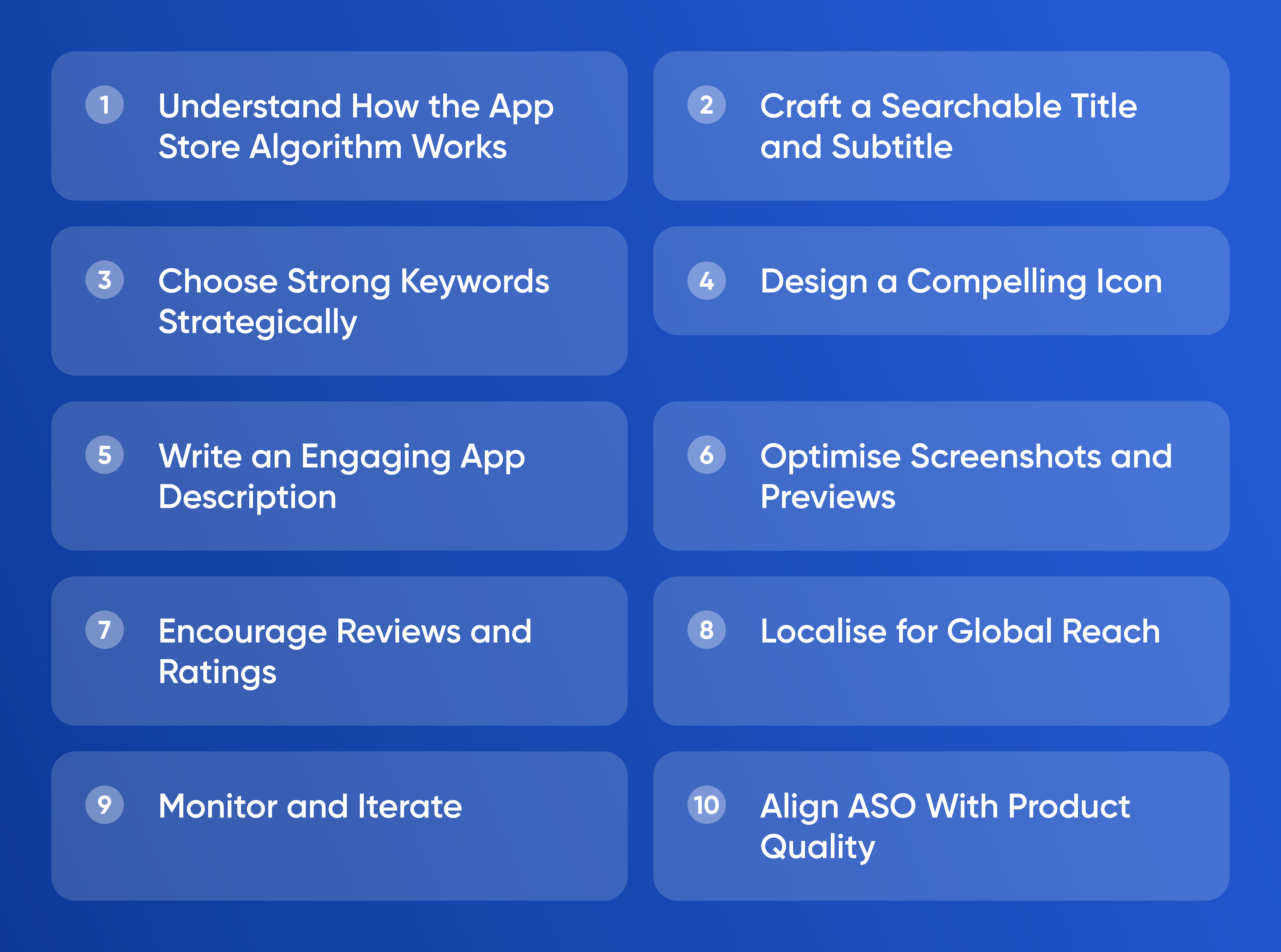
Understand How the App
Store Algorithm Works
Apple’s search algorithm ranks apps based on relevance, quality, and engagement. Relevance depends on keywords in your title, subtitle, and metadata. Quality depends on user ratings, retention, and crash rates. Engagement depends on downloads, reviews, and update frequency.
You cannot control the algorithm directly, but you can shape the signals it reads. Consistency and clarity matter more than hacks. Apps that align their metadata with real user behavior climb naturally.
Craft a Searchable Title and Subtitle
The app title carries the most weight for search. Combine your brand name with a clear keyword that describes what the app does. For example, “FlowMate: Task and Habit Tracker” performs better than “FlowMate.” The subtitle supports the title and gives room for secondary keywords. Keep both concise and human-readable.
Avoid stuffing keywords. Apple penalises spammy titles. Focus on one main phrase that captures user intent. A clean title improves click-through rates because it signals professionalism.
Choose Strong Keywords Strategically
Keywords are how users find you. Start by listing every word people might type when searching for your product category. Then use tools like AppTweak or Mobile Action to check search volume and competition. Pick medium-volume keywords that are relevant but not overcrowded.
Insert these terms in the keyword field of App Store Connect, separated by commas. The system combines them automatically to generate ranking combinations. Prioritise clarity over variety. Changing keywords too often resets momentum, so test updates monthly rather than weekly.
Design a Compelling Icon
Your icon is the first visual contact users have with your brand. It must be simple, recognisable, and legible at small sizes. Avoid excessive text or gradients. A strong icon should communicate the app’s purpose instantly. Study the top apps in your category and notice shared design patterns.
Testing icons is worth the effort. Slight variations in colour or shape can increase conversion significantly. Run A/B tests with Apple’s Product Page Optimisation tool to find what attracts clicks.
Write an Engaging App Description
Your description should read like a short sales pitch, not a technical document. The first three lines matter most because they appear above the “Read More” fold. Summarise what problem the app solves, who it helps, and what result users can expect.
Structure the rest into short paragraphs that highlight benefits, not features. Replace phrases like “uses AI to generate reports” with “helps you create detailed reports in seconds.” Every sentence should focus on user outcomes.
Update your description whenever you add meaningful features or shift focus. The algorithm rewards active maintenance, and returning visitors appreciate signs of progress.
Optimise Screenshots and Previews
Screenshots drive conversion more than any other visual element. Show the app in action, focusing on the core experience rather than menus. Add short captions that explain what is happening. Use bright, consistent backgrounds so your gallery feels unified.
Apple allows video previews. A fifteen-second clip that demonstrates value can raise conversion rates dramatically. Keep it fast-paced and intuitive. Users should understand what the app does without sound.
Encourage Reviews and Ratings
Ratings influence both ranking and credibility. A steady stream of positive reviews signals trust. Prompt users for feedback only after they have achieved a success moment, such as completing a task or saving progress. This timing increases positive sentiment.
Avoid overasking. One well-placed prompt performs better than constant interruptions. Reply to reviews, especially negative ones, with polite, constructive responses. Engagement shows accountability and can lead to updated ratings.
Localise for Global Reach
If your app targets users in multiple countries, translate metadata, screenshots, and descriptions into local languages. Localisation expands visibility and builds trust among non-English speakers. Even partial localisation—title and screenshots only—can boost downloads in new markets.
Research local search behaviour. Keywords that work in English may have different patterns elsewhere. Adapt messaging to cultural context rather than relying on literal translation.
Monitor and Iterate
ASO is continuous work. Track keyword rankings, conversion rates, and uninstall rates weekly. Tools like Sensor Tower and App Annie provide visibility into trends. When downloads drop, check whether competitors updated their listings or launched promotions.
Use A/B testing for elements such as screenshots, icons, and copy. Test one variable at a time so you know what caused the change. Keep a log of every update and its effect on installs. Over time, you will build a clear playbook for your niche.
Align ASO With Product Quality
No ASO strategy can fix a weak product. The App Store algorithm rewards apps that people use and keep. Monitor crash rates, fix bugs quickly, and update regularly. High retention and strong engagement amplify every optimisation effort.
Conclusion
ASO turns visibility into predictable growth. Use clear titles, researched keywords, engaging visuals, and continuous updates to earn organic discovery. The best founders treat their App Store page like a living storefront—always improving, always learning, and always aligned with real user value.